Showing posts with label HDR. Show all posts

Tuesday, February 3, 2015

More Adventures in HDR and other Photographic Games

The view out our living room window
February 2nd, 2015

I've gotten back to playing with my camera.  Several years ago, I was introduced to HDR  (High Dynamic Range) photography, and I tried it with mixed success.  I even wrote a blog post about it back in 2009 which you can read here, if you wish.  But eventually, I tired of the procedures involved and put them aside.  This past week, the sun was shining brightly here at home, and it was the last day of January, so I decided I should get out of the house and get some good landscapes--oh and while I was at it, find a few more geocaches.  Loading up my Garmin Montana 650t with caches from west of Thompson Falls to Clark Fork, Idaho, on both sides of the river, I jumped in the car with GPS, camera, a change of lenses, and tripod, and took off down the road.  I had gone just over a mile when I met Kevin coming home.  When he asked what I was up to, and I told him, he asked if I would like him to come along.  Well, duh.  Yes, I always enjoy his company on the road.

On the way to Thompson Falls, I asked Kevin to pull over, and I took a few pictures of Badrock Canyon.  This is the narrowest part of the Clark Fork Canyon between here and Idaho, and if you know where to look, you can see the marks left by the rush of Glacial Lake Missoula, as it poured down this canyon and across Idaho to scrub the landscape of eastern Washington.  The amount of water, and the speed with which it flowed left marks on the rock sides of the canyon that enable scientists to estimate just how much water went through here.  They say that the water came through the canyon at 9.46 cubic miles per hour, or 60 times the flow of today's largest river, the Amazon.  

Badrock Panorama
January 31st, 2015

While taking a few pictures, I noted an electric pole right in the middle of my shot.  I adjusted my stance, and took two pictures, one with the pole on the right, and one with it on the left.  I knew it was possible to "stitch" photos together to make a panoramic image, but I'd never done it with my DSLR. Back in the truck, I noted that our blue sky was disappearing as we headed west.  It was also quite cold and windy.  Not a good prognosis for more picture taking.

Long story short, we continued on west, eventually stopping just a few miles east of Trout Creek.  I grabbed ten new geocaches along the way, but the weather really wasn't cooperating, and I had hit some button on my GPS that stopped it from giving me the information I wanted.  In frustration, I suggested that we return home, and that's what we did, stopping at Simple Simon's in Thompson Falls for a pizza dinner.

Back at my desk, I transferred the images from my camera's memory card to my hard drive, and opened up Photoshop.  It turns out that in CS5, it's very easy to make a "stitched" panorama.  I was amazed.  I had expected to have a great deal of trouble making such an image, but the computer did almost all the work and I ended up with the Badrock Panorama posted above.  If printed at its normal resolution, that image would measure 1 foot tall by 40 inches wide.  I've found a new way to play!  By the way, the image at the top of the page, if printed at full resolution, would measure 1 foot tall by five feet wide!  And I created another image that would actually print out nine feet wide, if I really wanted to do such a thing.

Self Portrait in HDR
February 1st, 2015

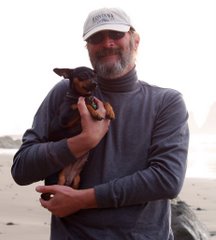
The simplicity that CS5 made of "stitching" together panoramic shots, made me take another look at HDR images.  Accordingly, I set up the tripod in the living room and took three bracketed self-portraits, which I combined to create an HDR photo of my face--with every possible line and wrinkle in plain view.  I posted this image on Facebook, and one of my artist friends commented that she'd really like to take that portrait and copy it in oil.  I've never had someone want to paint my portrait before.  I'm tempted to let her.

The next day, I tried the self portrait again.  This time, I did not sit in my recliner, which left me back-lit by the picture window, but rather moved to the couch which faces the window.  Unfortunately, I did not move the chair from the background, so I ended up with Mickey Mouse ears, but I like the portrait so much that I made it my new Facebook profile pic.  Another FB friend suggested that the picture looked like someone had taken a black and white and hand colored it.  I'll let you decide.  Just for comparison, I'm including the same photograph processed as a single image so you can see the difference between a "normal" photo and a three-layered HDR shot.

Second Self Portrait in HDR
February 2nd, 2015

I've also tried some HDR shots through the window, looking at the trees and the deer in the fog.  They have an interesting look, but when I take the image and process it as I normally would, I think I prefer the non HDR version.  In any event, I've certainly found a new way to occupy my behind the camera time, and I look forward to more sunny days along the river and lake.

Self Portrait as a "Normal" Photograph
Don't you like the HDR version better?
February 2nd, 2015


Sunday, July 19, 2009

Adventures in HDR

But I see your true colors
shining through
I see your true colors
and that's why I love you
so don't be afraid to let them show
your true colors
true colors are beautiful
like a rainbow

--Cyndi Lauper


To hear Cyndi Lauper sing True Colors, click here.


Indian Paintbrush--finally an image I like!
HDR Image taken 7/18/09
Glacier National Park, Montana

I'm not a Ham Radio operator, nor do I claim to understand the passion that so many Ham operators seem to have for their activity. I can appreciate the service they give to the community, especially in times of peril, and I can see how it can be fun to talk with anyone or everyone while you're driving down the road. I do go into on-line chat rooms, after all, and I see little difference other than Ham Radio is much older as an activity.

That said, as many of you know from reading my blogs over the past year, I'm all but married (Thanks DOMA, for nothing) to a Ham operator, and some of our closest friends are also Hams. (Is that what they're called? I'm afraid to ask.) Yesterday our friend Mike drove us up to the Waterton Glacier Hamfest for 2009. We attended the 2008 get together as well, and we couldn't help but notice that a lot more people were driving to northern Montana this year than last. Could it be that gas is no longer over $4.00 a gallon?

A Hamfest like this is a chance for people to get together, swap stories and equipment, and even take in a few activities of mutual interest. Personally, once I've gone around the ring of motor homes and seen all the old equipment I care to see, I'd just as soon leave the chatting to those who share a passion. My passion is photography, so while Kevin and Mike chatted with fellow Hams, I headed out around the campground, camera, bag and tripod in hand.

Very Showy Aster
HDR Image Taken 7/18/09
Glacier National Park, Montana


You may remember my previous posts on High Density Range photographic imagery. If not, you can read about it here and here. One of the main things I have learned is that a tripod is more than a luxury, actually more of a necessity if you want your pictures to come out at all well. I've also learned that I never seem to have the right lens fitted to the camera, so this time I had both the tripod and the camera bag with all my lenses with me.

As in previous HDR work, I started out with flowers--the wildflowers growing around the campground. These were mainly Queen Anne's Lace, Daisies, Showy Asters, and Indian Paintbrush. I love paintbrush, but have never been able to get a decent photo of the plant. My shots have always looked as if they would make better impressionist paintings than crisp, bright photographs. This trip I worked a lot on shooting paintbrush. I like the image at the top of the page. Hope you do too.

Fence
HDR Image Taken 7/18/09
Glacier National Park, Montana

But where I had questioned HDR imagery before was in landscape photography. Since my earlier attempts, which frankly made me wonder what was the big deal with HDR, I've read that some photographers use HDR in landscape work because they feel it renders the image more life-like. The colors come out closer to what the eye sees. I therefore resolved to move away from macro shots of flowers, and try again with the landscape work. I'm pretty pleased with the way things turned out. As you can see here, I not only tried landscapes, but also some middle ground shots like the fence above, and even a stolen red pickup. (In case you're wondering, I'm putting together a photo book of red pickups I've seen around the country. They are "stolen" only in that I don't tell the owner what I'm doing nor do I ask permission.)


I did partake in one of the Hamfest activities. I suppose because people who are into one kind of gadget are also into others, there was a special workshop on GPS units and geocaching. As a novice geocacher with 150+ finds to my credit, I attended the workshop. Turns out it was very basic, intended for people who had little to no experience with geocaching, and I can't say I learned anything new. I did have several people ask me about my camera and photography, though, so it wasn't a complete waste of time.

Shortly after the geocaching workshop, we heard the chop-chop-chop of a helicopter overhead. Yes, it was one of those confounded black helicopters the conspiracy theorists love to complain about. After circling the area about three times, it landed in the field where I'd been taking photos earlier in the day. Ah--it was Homeland Security come to check up on us. We were, after all, practically on an international border and there were lots of non-US flags flying (Canada, British Columbia, Alberta, Saskatchewan were the ones I saw). Lots of US flags were flying as well, as befits an international gathering. I have no idea what the Customs and Border Protection folk were doing there, but in no time they had drawn a large crowd, many of whom climbed into the chopper.


Birch Grove
HDR Image Taken 7/18/09
Glacier National Park, Montana
If you choose to look at only one image full screen,
choose this one!

By this time, we were ready for lunch, and since the burger line was so long at the gathering, Mike, Kevin and I headed back toward West Glacier. I was happy to introduce Mike to the Isaac Walton Inn at Essex, Montana--a former Great Northern Railroad Hotel on the south edge of Glacier Park. We stopped there for lunch (and more photos). I had a great buffalo French dip. Kevin and Mike were more conventional in their choices, but we were all happy with our meal. I would give the Isaac Walton Inn my highest recommendation. The food is always good, the location is beautiful, and the rooms are reasonable. Give it a try next time you're in the area.

After lunch, we headed on to West Glacier, and then into the park itself. Stopping first at Apgar Village, I got some very nice pictures of the old Gearjammer Ford motorcoaches that still carry tourists up and over Logan Pass on the Going to the Sun Highway. I also got some nice views of Lake McDonald both from Apgar Village and from the Lake McDonald Lodge.

We all had such a great time, that we decided that next weekend we'd head back to Glacier and this time drive all the way across the park on Going to the Sun. As I took no more images for HDR processing after leaving the hamfest, you won't see any of my Glacier Park pictures in this post. You can see them, however, on my Picasa on-line galleries. The HDR photos are all in the album Adventures in HDR and the images I've processed normally are in the 20090718 album.

As always, all links and photos can be viewed in a new window. I really recommend looking at the images I've shared on this post in a full screen mode--just double click on the image and it will open full screen in a new window. And while we're at it, what do you think of this landscape HDR shot?

Looking into Glacier National Park
HDR Image Taken 7/18/09


Monday, June 22, 2009

HDR -- What the *** is HDR?

Study in Orange
(A poppy growing in my next door neighbor's front yard)
One of my first efforts at HDR Imaging
Taken 6/20/09 in Missoula, Montana

NOTE: Clicking on any picture, or on any link, will open a new window without closing the current window, and show the pictures full screen or larger (depending on your screen). I really recommend viewing the photos full screen so you can get a better idea of just what HDR imaging can do.

WARNING: The text here is probably of interest only to those people who are having fun playing with digital photography. Feel free to view the pictures and skip the text. Or skip it all, how will I know?

Kodachrome
They give us those nice bright colors
They give us the greens of summers
Makes you think all the world's a sunny day, Oh yeah
I got a Nikon camera
I love to take a photograph
So mama don't take my Kodachrome away

--Paul Simon

To hear Paul Simon sing Kodachrome on YouTube, click here!

Forget Mama, Kodak is taking Kodachrome away. Apparently there is only one place left in the country that actually processes Kodachrome. But that is beside the point. Can't remember the last time I actually bought Kodachrome, or Ektachrome for that matter. For a brief while after I bought the Nikon Coolpix for my birthday in October 2006, I continued to use my Pentax 35mm SLR, but once I got the D80, I went completely digital and haven't looked back. Apparently I'm not alone in that. Even for Kodak, 70% of their current business is digital.

And digital photography is amazing. The things you can do with those bits and pieces known as pixels once they're cavorting in your computer. With Kevin on the road, and my evenings now free for me to do whatever I choose, I chose to start improving my digital photography skills. First off, I started looking back through the past three years of pictures I've taken with my great Nikon D80, and it was sobering to find that the pictures I took three years ago look much better than the ones I'm taking now. Have I gotten lazy? complacent? Whatever, it's not a good thing to regress in one's skill set. SO....

I now have available to me Adobe's Creative Suite 4 with a whole range of great programs, including Photoshop CS4. Up until now, I've used Photoshop Elements for all my editing work, and it has served me well. I'm told that anything you can do in Photoshop, you can do in Elements, but you'll have to work twice as hard. Then again, learning how to use Photoshop involves a lot of time and effort, but I think it will be worth it.

Recently I followed the lead of a couple of on-line photographer friends and joined Red Bubble as a way to offer my photography for sale on-line. As with many other on-line social networks, Red Bubble has a variety of groups you can join. One I joined is for those who photograph wildflowers. Among the stated criteria for this group, I found the following: No photoshopping or HDR work will be accepted. OK, I can agree to this--except I have no idea what HDR means.

Good Morning, Glory
Weeds growing by my mailbox
Another early HDR effort
Taken 6/20/09 in Missoula, Montana

As it turns out, HDR is the abbreviation for High Dynamic Range. (The link will take you to the Wikipedia article on HDR Imaging.) I can't speak for you, but I'm of the generation that never accepted being told what we could not do. I had to find out just what HDR is and how I could play with it. Scott Kelby, the author of one of my Photoshop CS4 manuals, was just the man to tell me what and how. In fact, he has a whole chapter devoted to HDR in his Adobe Photoshop CS4 Book for Digital Photographers (Voices That Matter). Yes, that's the whole title of the book.

I followed his instructions scrupulously to produce four of the five images shared in this post, but first I had to go to my Nikon D80 manual and learn one more thing to do with my camera. Bracketing. Now I have always known what bracketing is. My dad used to bracket his pictures on a regular basis. What I didn't know was how to do it automatically with my Nikon. Now I know. (If you don't understand bracketing, it means that you take the same picture using different exposures, usually one you would consider standard, then one that is over exposed and one that is under exposed.)

So, once you have three to five bracketed shots, Photoshop allows you to merge all the images into one, in essence bringing out the details that would normally be washed out or hidden in the shadows. For the first time since I bought it, I found a reason to have a professional level Nikon instead of my one-step away from professional D80. The professional level cameras allow for 5 shots when automatically bracketing. My D80 only allows for 3. Still, given the length of time it takes Photoshop to merge three shots, I hate to think what it would take to do 5. I won't go into the numbers involved, but suffice it to say that even using 3 shots, the resultant image has more detail than standard computer monitors (or even paper should you print the image out) can handle. An HDR image starts as 32-bit or even 48-bit (whatever that means), as compared to a J-PEG image which is 8-bit. Whatever it means, it's a lot of information for your computer to handle. Once Photoshop has merged the various images into one, you can then edit that one in either Camera Raw or through the regular editing processes.

Statue of Christ in St Mary's Cemetery Annex
(I'm not happy with this image, but share it as an example of how 3-dimensional the statue becomes in HDR)
Taken 6/21/08 in Missoula Montana

After taking several macro shots of flowers and merging them into HDR images, I decided to see what would happen with larger scenes. Driving out behind our home to climb the hill and get a view of the valley, I passed the St Mary's Cemetery Annex. The sun was positioned exactly right to really light up the statue of Christ. What a subject, I said to myself, and got out of the car. By the time I got the camera on the tripod, and the tripod set in position--and most importantly by the time I realized that the camera was no longer set to automatically bracket shots, the sun had moved off the Son. So as I noted above, I'm not very happy with the final result, but it does provide an example of how isolated features, such as the statue, become almost 3-dimensional in HDR images.

Now all this supposes that you are getting exactly the same scene in each of your bracketed shots. My D80 can shoot 3 frames per second, but it's amazing what can happen in that short amount of time. I know from experience now that if you're shooting a flower that is blowing in the wind, you'll end up with a very strange, almost abstract design. Nor am I completely convinced that HDR is the way to go--at least not yet. The image that Kelby uses in his instructions is an urban landscape. With that in mind, I drove up WaterWorks Hill north of town to shoot some scenes looking over the Missoula Valley. I was careful to use the tripod and make sure the camera did not move while shooting the three bracketed images. I then processed the three as an HDR image and also processed just the standard exposure as a regular J-PEG image. I am posting both here so you can make up your mind. The flowers, I thought, were superb. The landscape, well, I'm not sure it's worth the effort. The main difference that I can see is that the clear sky is washed out in the J-PEG, but still shows blue in the HDR thanks to using the extra exposures. The overall coloring is lighter in the HDR, again because of the extra exposures, but which final product is better--well that's a judgement call. I will keep trying, experimenting, honing my skills. After all, with Kevin on the road, I do have all this time on my hands.

The Missoula Valley at 7 p.m.
This is the j-peg processed from just the standard exposure.
Taken 6/21/09 in Missoula, Montana

The HDR version of the same image
(This uses three bracketed shots merged into one image)
Taken 6/21/09 in Missoula Montana